

Update: SDL3/Wayland branch merged to main, GH release bin updated along with AUR packages.
There’s no good standalone controller-driven on-screen keyboard on Linux. Steam’s keyboard requires Steam running. Other virtual keyboards (Onboard, Florence) need a mouse pointer or are dead projects. I wanted something that takes D-pad and stick input directly, like a console, but can be launched independently of specific games or platforms.
So I built one written in Go with SDL3 and native Wayland layer-shell support. It works as a daemon with a configurable controller combo to toggle show/hide. AUR packages ( gamepad-osk-git , gamepad-osk-bin are updated to v2.
If you’re on Wayland with a gamepad, I’d appreciate testers. Bug reports and PRs welcome. Wayland testers still welcome - especially GNOME (falls back to standard window, no layer-shell). Bug reports and PRs welcome.
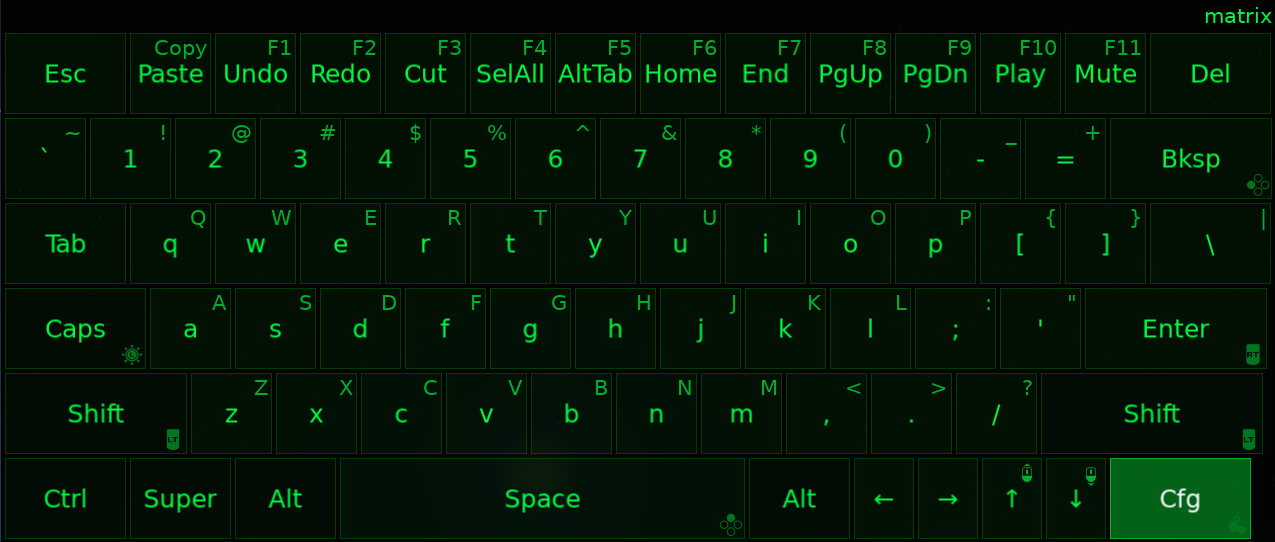
Features :
- Full QWERTY with shortcuts row (undo, redo, cut, copy, paste, select all, Alt+Tab, media keys)
- D-pad navigation with stick-driven mouse cursor
- Modifier support (Shift, Ctrl, Alt, Super, Caps) with visual status indicators
- Button-hold key repeat for backspace, space, enter
- Alt+Tab key for multiple Tab presses
- Auto-reconnect on controller disconnect/timeout
- Configurable button mapping, 60 themes, adjustable opacity
- Sub-1% CPU idle, under 4% during active input
Have you already tested this on Steam Deck? That would be awesome.
SDL3/Wayland branch merged to main, bins updated along with AUR packages. Works fine in KDE with some caveats (opacity doesn’t work and I can’t teleport your mouse cursor - these are Wayland limitations/security).
Nope. Just on my Arch systems (XFCE w/ X11) & Void Linux w/ X11. I am planning to run through some manual tests in KDE Plasma which should be applicable to Steam Deck and CatchyOS, but I need to build a proper test env. Ive done simple tests in Sway and KDE with nested sessions, but those are just spot checks not full testing. I need to boot into real systems for full testing.
I’ve been wanting a better on-screen keyboard for my TV gaming box. The Steam on-screen keyboard gets cut off at the edges of the screen when I run KDE at 1.25x DPI scale.
Is there any chance that this would work as a Flatpak? The machine I want to use this on runs Bazzite, though it’d be helpful for running it on other distros too.
Doing so defies the Flatpak security model since the app needs raw evdev and uinput device access. Since Bazzite has a read-only root, you’ll need to layer the runtime dependencies:
rpm-ostree install SDL3 SDL3_ttfThen reboot. The udev rule for uinput access goes in /etc which is writable on Bazzite:
sudo cp gamepad-osk.udev /etc/udev/rules.d/80-gamepad-osk.rules
sudo udevadm control --reload-rules
After that you can build inside a distrobox and run it from ~/.local/bin. I think these will work to build the current branch, I’m not on Bazzite (Fedora):
distrobox create --name build --image fedora:41
distrobox enter build
sudo dnf install golang SDL3-devel SDL3_ttf-devel libX11-devel wayland-devel
git clone -b sdl3-migration https://github.com/0x90shell/gamepad-osk.git
cd gamepad-osk
go build -o gamepad-osk .
cp gamepad-osk ~/.local/bin/
exit
Promptfont is optional (shows controller button icons on keys), but I recommend it. To install:
wget https://github.com/Shinmera/promptfont/raw/main/promptfont.ttf mkdir -p ~/.local/share/fonts cp promptfont.ttf ~/.local/share/fonts/ fc-cacheJesus christ… the developer of useful linux program getting downvoted for explaining things…
Lemmy is fulll of entitled chilren who think they are morally superior to redditors…
It’s really undeserved, especially since the dev went out of their way to write a detailed install procedure for Bazzite. I just gave them an upvote on that comment, but I wish I gave them one sooner.
Is it theoretically possible for an on-screen keyboard to not need raw device access?
Yeah, if it only handles the display side and relies on an accessibility framework like AT-SPI or IBus for input injection. That’s how Onboard and GNOME’s built-in keyboard work. But those frameworks need a cooperative desktop environment and don’t work consistently across compositors.
This tool needs raw device access because it does more than just display a keyboard:
- Reads gamepad input directly from evdev (d-pad, sticks, buttons, triggers). Accessibility frameworks don’t handle gamepad input, only keyboard/mouse.
- Injects keyboard and mouse events via uinput. AT-SPI/IBus can inject keystrokes but not mouse movement or arbitrary key combos like Ctrl+Z.
- Grabs the gamepad exclusively while visible so input doesn’t bleed to the game. No framework exposes device grabbing.
- Emulates a mouse cursor from analog stick input. Continuous analog-to-mouse translation isn’t something accessibility buses are built for.
TL;DR
Raw evdev/uinput is what lets it work standalone on any compositor without depending on desktop-specific APIs. The trade-off is device permissions instead of accessibility bus access.I see. I wonder, does any of this have issues on Wayland? I try to use it wherever I can for its security benefits, though I know it’s not as flexible as X11 in some cases.
Also, I don’t know where that downvote came from, but it wasn’t me. I gave you an updoot to bring you back above 0.
I pushed the Wayland branch to main and have an updated bin if you wanted to avoid building yourself, though you still need to follow my non-distrobox instructions to test.
No worries about the downvote. evdev and uinput are kernel interfaces, they work the same on Wayland and X11. The display side has native Wayland support via wlr-layer-shell (Sway, Hyprland, KDE Plasma). Steam does the same thing I’m doing for gamepad input - reads /dev/input/event* directly via SDL, creates virtual devices via uinput for remapping. Same kernel interfaces, same udev rules.
deleted by creator

