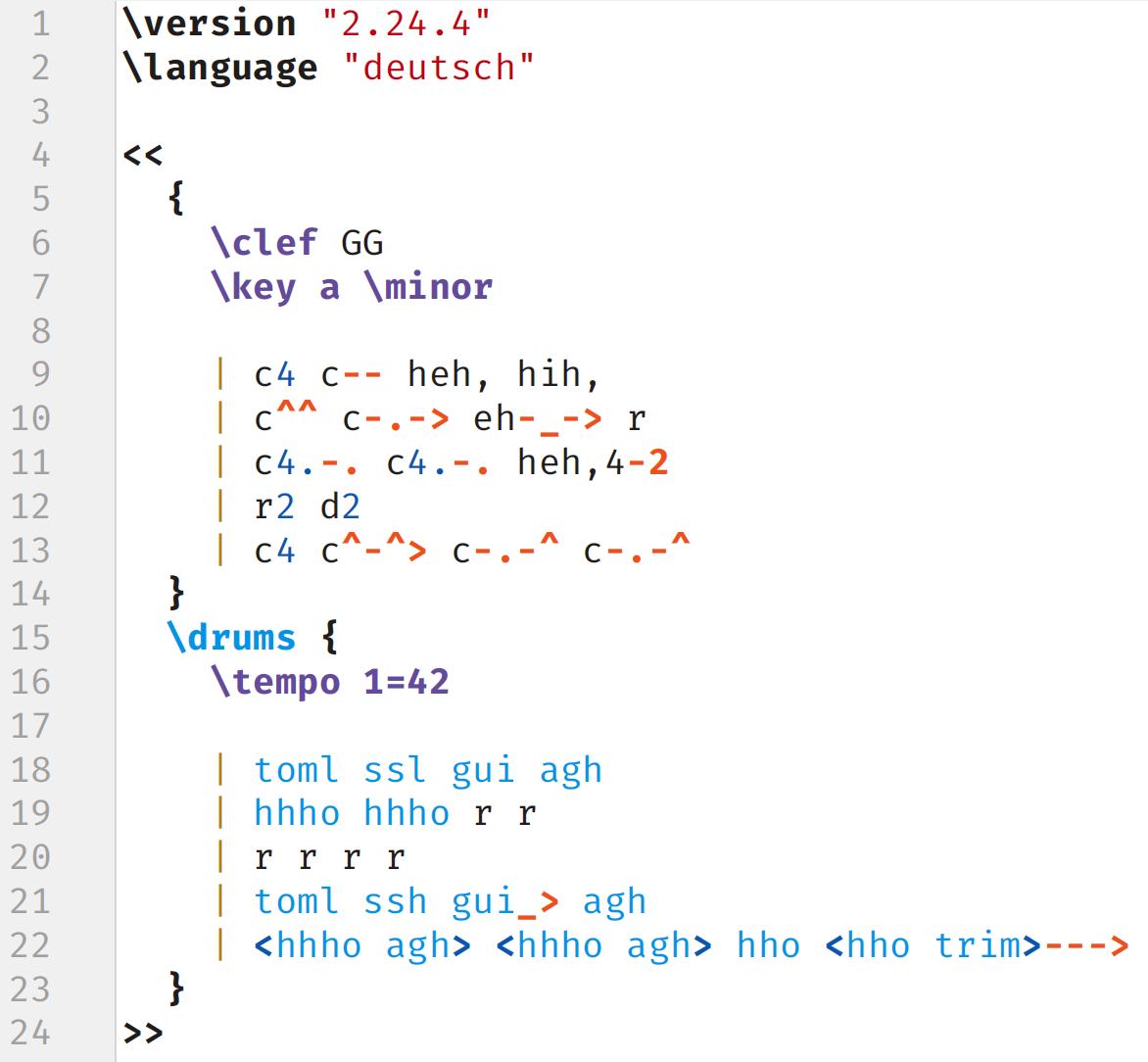
I write sheet music with Lilypond: https://lilypond.org/text-input.html


I write sheet music with Lilypond: https://lilypond.org/text-input.html
Had to just think about why #[non_exhaustive] exists, so perhaps this helps you as well:
Imagine you’re developing a really important core library, something like TCP. And then other libraries depend on your library.
Now, if you change your implementation, you may need to introduce a new error case, even though the rest of the API still works the same.
You have two choices to deal with that:
#[non_exhaustive] before going 1.0 and therefore forced all depending libraries to implement a default match case. You can sneak in the new error case in version 1.1 without all those depending libraries needing to manually upgrade. The ecosystem does not split in half between 1.0 vs. 2.0.Obviously, if it’s a really egregious new error case that needs specific handling, then you might still want to release version 2.0, but by adding the #[non_exhaustive], you can decide later on and if you are such a central library, there’s definitely going to be situations where you want to make use of it.
Damn, this looks like it might solve my pain points with error handling. Will have to see, if it replaces them with new pain points, since error handling is fundamentally hard, but at least, it isn’t starting completely from scratch…
Hmm, in my case, it was certainly part of the problem that I tried to back up directly to an SMB share. It wouldn’t complete even after hours, and my best guess is that it somehow created the copy in/of the home-directory when the connection failed.


Apparently, the whole argumentation is kind of daft and making wrong assumptions: https://programming.dev/post/57383912/26317185
Well, what preprocessor would you add, other than denylisting certain words? 😅
If you use an LLM to try to detect the semantics, you’ve got the same problem again…
I’ve had that happen before when an rsync command for uploading backups was doing shenanigans. I think, it choked on a very large folder, but I just excluded that folder and then it was fine.
Well, they would typically have a system prompt (like an invisible chat message that’s sent to the LLM at the start of the conversation), where it would tell the LLM something like “You’re a helpful chatbot. Talk cheerfully and use 🩵 all the time.”
And in that system prompt, you can also give it instructions to only answer certain questions. But it really is like a chat message, in that it just as well might ignore those instructions when another chat message asks it to.
OP chose the formulation “Before I subscribe to a creator, …” which might be necessary here to get it to answer, as it might have been told to only help with creator subscriptions, but then the formulation implies that by answering this question, it is helping the user to subscribe. That’s called a prompt injection.
If you can find a prompt injection, then yes, you can do this with any chatbot.
Although they might still not be as useful as a dedicated tool, since they likely can’t do tool calls, like web searches or running the compiler.


Yeah, I always tell people the fundamental problem with comments is that they’re only visible in one place. Method/variable name, log outputs, error messages, docstrings all show up in at least two places, which makes them more valuable in general, but also makes it more likely for them to be read+updated.
Unfortunately, hibernate does not work on all devices. I believe, it depends on the motherboard and BIOS…


It’s funny when someone says “I want a solution besides X” and we all kinds to to say “uhhhh, srsly, X is the answer”
I mean, yeah, you kind of have to point it out. Newbies won’t be able to judge how much they’re making their life harder by wanting to do it their way. 🫠


Yeah, not a bad stance to have. When I switched to Linux (in the middle of a compsci minor), I thought I was the king of the world and that I knew everything about computers.
Then Linux showed me that I know fuckall, not because it was particularly hard, but rather because it’s an open library.
You can look at a random config file on your PC and it will explain you highly technical concepts for free.
You can look at the source code of anything you’re interested in. Well, or probably rather read an explainer from someone who read/wrote the source code.
And you can easily look at the logs of your applications to debug them.
Every so often, I run into folks that genuinely seem to know a lot about Windows, and I always wonder how. It doesn’t explain anything to you. 😅


Just to point it out: Having a USB stick with a Linux ISO laying around can be a lifesaver.
Even if you decide to go back to Windows or whatever.
Because you can actually boot off of the USB stick into a practically fully functional OS, so without installing, and then access the files on the hard drive, in case your installed operating system bites the dust (so long as the hard drive and filesystem is intact).
So yeah, might be worth the invest…
Hmm, for me it works to click on that sidebar button once to hide the sidebar. And then right-click on the sidebar button and select “Remove from Toolbar”.


Yeah, I was gonna say, just a bunch of Markdown files would probably be fine. Use e.g. mdBook if you want a static webpage with search.
A dedicated service might have some advantages, but personally, I’d care much more about having my recipe collection in a format that I can access without specific software.
But it isn’t bad publicity. The reporting on a new theme or icon is generally pretty neutral.


I doubt that’s an unpopular opinion. It’s just easier to complain than to praise and we have a lot of techies here who have their specific workflow + customizations that are disrupted by the changeover.
Counterpoint: They need to get into the news to attract new users. There is no better way to do that than to update the theme or the icon.


Small nitpick that I noticed while skimming the code:
Where you define your constants, you can change those comments to be doc-comments instead, so that your editor can display them when you hover over constants.
And personally, I would go one step further with the units, by putting them at the end of the name of the constant, like you did with some variables in the code. That way, the unit shows up inline while reading code that uses the constant, which makes it easy to see that units match up (or not).
Side-note: You don’t have to denote the unit for Duration. You construct it from milliseconds, but then it’s unitless and you decide where you use it in what unit you want the value. So, Duration is very cool and I would recommend using it for LRC_START_THRESHOLD as well.
But yeah, back to the comments-thing: Plain comments are kind of inherently crappy, because they only show up in one place in the code, so you’re less likely to see them and less likely to update them. By putting things into doc-comments, names, log statements, error messages etc., they show up in at least two places.
Plain comments only really make sense for explaining why the code does something. The what can generally be explained in other ways, at least in a sufficiently abstracted language like Rust.
Gotta love corporate announcements. “We’re making a change, but nothing will change. We also won’t tell you why we’re making this change.”