Tuukka R
- 3 Posts
- 16 Comments
I cannot get that to work. I tried this link: https://piefed.europe.pub/post/35873 . And no. Nothing.
FreeBSD is not Linux, though…
I’m running Ubuntu, which is basically Debian, so I tried my luck and yes, those packages existed with those names and versions. Installing them as instructed, rebooting the computer (probably restarting Wayland would have been enough, but whatever, this took less brainpower) and launching the game again almost solved the problem for first. It did crash in the same spot again, but then I went to the launch options, removed the line I had there before and replaced it with the debug line. After that, the game launched properly and I was also able to load my save and be back to Megaton where I happened to be the last time I saved (after getting scared of some super mutants).
My apologies for not obeying you completely, as I have already mostly played through Fallout:NV, and Fallout 3 is more interesting to me right now 🤪
So, the game’s working now. Thank you! :) Apparently my Ubuntu had somehow removed some of the drivers in the background. On whose permission did it do that, if I may ask? Grr.
Once again, thanks! <3
What you’re looking for is PostmarketOS. On their website you can also see what tablet devices it runs on more or less perfectly and on which ones some of the features are missing.
I think their website answers all of your questions.
I started using Linux most of the time in 1998 because my parents had installed RedHat 5.2 to dual boot with Windows and I didn’t like what Microsoft was doing back then, so I decided to use Linux whenever I’m not playing games. (And then moved on to SuSe 7 in 2001, then to Debian, and later, when Ubuntu was invented, moved to Ubuntu, and when Linux Mint came around, started using that one. (wait, no, actually I moved only when I got pissed off by Unity, which was horrible in its first forms!) Starting from Debian, things were already quite easy, although configuring the graphical environment, X, was super tedious…)
It’s a bit weird feeling reading about how people write about how bad Windows has gone, and not really having experience of it since Windows 7, that I did have for a while in between. That was probably in 2011 or so. Then I soon got a new computer and kind of forgot to install Windows on it, because things worked well enough anyway.
In any case, already when Ubuntu came out, I already felt that every time I had to resolve my friends’ issues on their Windows computers that it was a very good thing that I was running Linux at home, because it meant there was so much less hassle! It felt like “damn, if people only knew how well this works these days, they’d never want to use Windows. And then there would be more software as well!”
You can find the kernel version by writing “uname -r” in the terminal.
In my case it prints “6.8.0-79-generic”, which would be the answer if NewNewAugustEast had asked me about how old my kernel is. Yours is probably something else than that precise version. Except that I’m running Ubuntu and Mint is also kind of Ubuntu.
If you want, you can also paste the output of: “lsb_release -d”, NNAE might be curious to know that, as well.
For your personal use, you can use uname -a and lsb_release -a, but I had the feeling some of the output of those would be things you wouldn’t want to say publicly but might not understand to redact.
Tuukka R@sopuli.xyzOPto
Voyager@lemmy.world•Voyager difficult to start using for existing Lemmy usersEnglish
4·1 year agoI would say that having three buttons of similar size would do no harm to ease of starting for those with no preexisting account.
So:
[ Join Lemm.ee ]
[ Join another instance ]
[ Log in to your instance ]
The login button could be on a different colour, but its shape and size should be the same as of the two other options, and, in my opinion, it should be grouped together with them.
(And indeed! Voyager is an awesome app and I’m complaining here only because I’ve seen you strive for excellent quality. Thank you very much for this awesome app! ❤️)
Tuukka R@sopuli.xyzOPto
Voyager@lemmy.world•Voyager difficult to start using for existing Lemmy usersEnglish
3·1 year agoI wonder if “Log in” and “Learn more” being of equal size might be confusing?
It’s difficult to say because now that I know the button is there, it feels like only an idiot would miss it. Would need to make human experiments with people who have no experience on Lemmy. Like, make them try to log on with my username on their own phone.
Tuukka R@sopuli.xyzOPto
Voyager@lemmy.world•Voyager difficult to start using for existing Lemmy usersEnglish
4·1 year agoI asked for a person without a Lemmy account to install Voyager and make some screenshots. So, here’s what my experience was like, and apparently that of others as well. I hope it helps understand in which way the average user is an idiot :) Here goes:
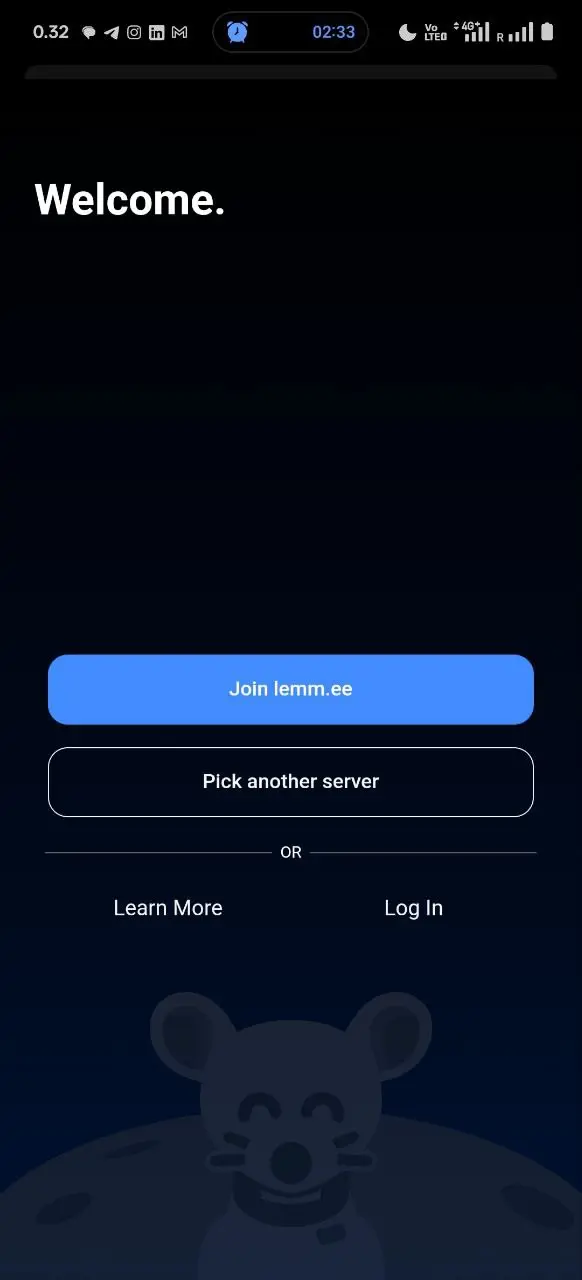
First, I launch the program. This is the screen I get:

So, I’ve already got an account, so I don’t need to join Lemmy. Therefore, I choose the other option, “Pick another server”, in order to tell which server my user account is on, and log in to that server.
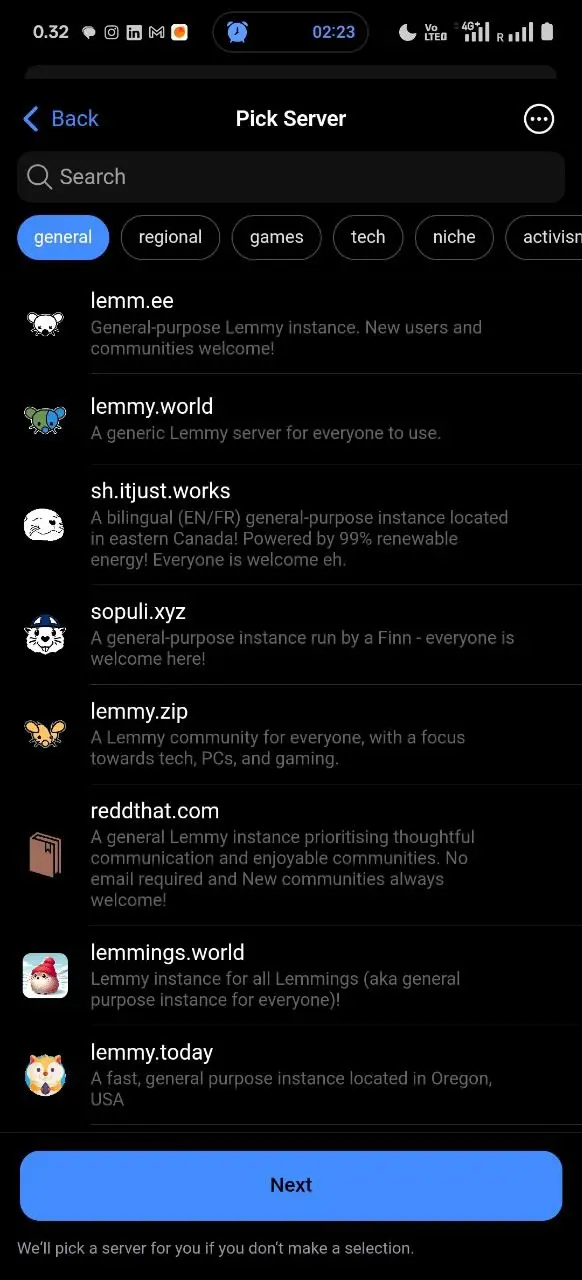
Then I’m in this screen:

I choose Sopuli and all I get is a form for creating a new username. But why would I want to create a new one? I tried long-pressing the sopuli.xyz text, and got nothing.
Obviously, in the first screen there is the “Log in” button, but because there was “Join” and “The other option”, I had assumed the “other option” must include the login. The text can be interpreted that way as well.
And, at the point when I was already at the list of Lemmy servers, the “Log in” option was nowhere to see, and I didn’t come up with the idea of going back to the first screen, because I assumed I had already seen both of the buttons there, and I was sure I had pressed the button that was not “Join lemm.ee”.
Then I gave up. Some days later I accidentally launched the program again when I was supposed to do something completely different on my phone. Oops. But, the good thing was, I got to that first screen again. And I double-checked that I’m indeed pressing the “Pick another server” button in order to log in with my pre-existing username, and then I noticed the Log In text that is not a button. And pressed it and found out that yes, Voyager does actually support using pre-existing usernames! And nowadays I’m using Lemmy.
Now I’ve heard of a few people who have installed Lemmy and all of them have first given up, and then tried again after I’ve told them to “look for the hidden Log In button in the first screen”.
“Log in” is what most people will want to do, so people will assume that it will be one of the most prominent buttons. There can be reasons not to make it more prominent than it is; in that case the next screen, with the list of servers, could have a button for “Actually, what I want to do is log in with a username I already have!”
Tuukka R@sopuli.xyzOPto
Voyager@lemmy.world•Voyager difficult to start using for existing Lemmy usersEnglish
1·1 year agoI’d like a “write here or choose from the list below” approach :)
How much would this actually increase the load of a Lemmy instance?
I’d imagine that when I’m actually browsing Lemmy, I consume so much data that the polling probably wouldn’t cause even a tenth of a percent of that load. But, I don’t know the technology, so I could be completely wrong with my understanding of how much it would strain the Lemmy instances. How big would the strain be in proportion to how much a Lemmy user strains the instance’s server anyway?
There is a workaround used by Element and Telegram FOSS. They have notifications without using Android’s standard notification system.
For example Telegram FOSS and Element use a workaround to avoid using the google tool for this: If you make a permanent notification that is visible in Android’s notifications menu, you can make this feature work. It’s a bit stupid that there is constantly the Telegram logo and the Element logo visible on the upper bar on my phone’s screen, but in the end that doesn’t really matter.


I usually like being notified of messages in certain chats. But even with that I’d like to be able to choose which chats are allowed to disturb me no matter what and which ones should make noise but not that damn much!