

1·
1 month agoI can enter Ubuntu and Windows just fine via my grub boot menu. I now tried manual partioning in different variants, not leading to a bootable install (see my update in the pist for more info)
I can enter Ubuntu and Windows just fine via my grub boot menu. I now tried manual partioning in different variants, not leading to a bootable install (see my update in the pist for more info)
It only says, that it doesn’t support steam game mode. I don’t think this should prevent an install. My problem is definitely partioning and EFI related
I tried a seperate EFI partition (described in other comments above). Got me past this error, though due to another error not to a bootable install. The additional EFI partition stays empty
On the download site they list a section for legacy Nvidia GPUs, including the 10XX series. So I guess that image should already have the correct drivers.
In fact I tried with both Nvidia versions (since I only later had seen the legacy section). Both fail at the same point, before anything GPU related happens.
Secureboot is permanently disabled on this PC. What other stuff should I disable in the UEFI?
Mhh, I will check that as soon, as I have time again
Today I tried this. The original EFI partition is 1.4 GiB, which should be big enough; I tried nonetheless. The installer has a partioning helper (available through the tree dots menu), though that didn’t show any disks. I had to use gparted to create the partitions. The mentioned error didn’t appear again after I used this partioning:
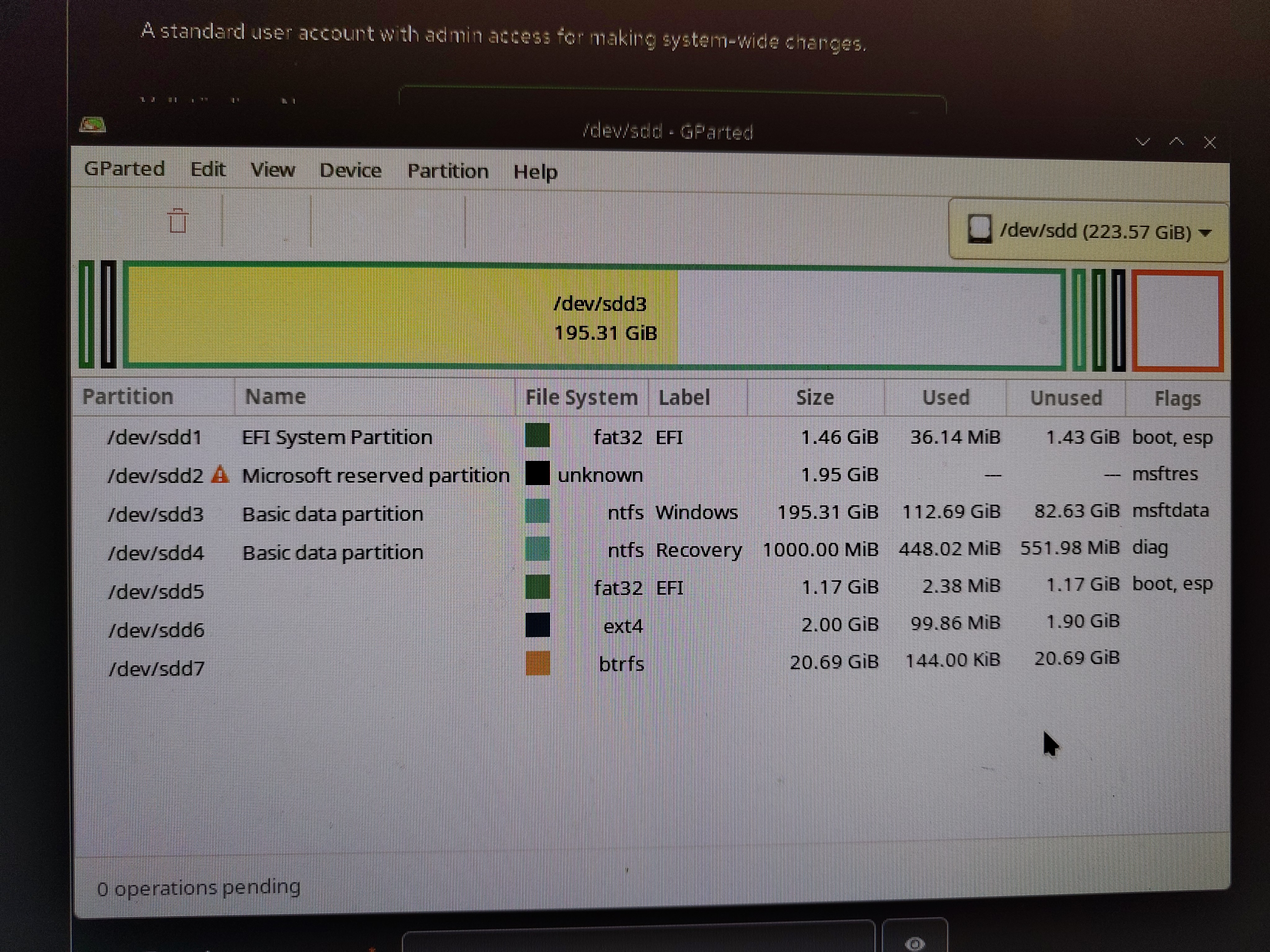
The boot and esp flags where necessary for the installer to accept the EFI partition.
Though I got another error later in the process:

The new EFI partition was completely empty afterwards (checked through my Ubuntu). No grub boot menu entry either.
Yes. First I tried having 2 partitions (/boot and /) then I tried to build an additional EFI partition (/boot, /boot/efi and /). Though I could not create the partitions in the installer, since the storage helper (which is reachable through the tree dots menu) didn’t show any storage devices (though gparted and lsblk had no problems seeing them). I then created the partitions using gparted
In fact then the mentioned error didn’t appear. Instead I got a different error at a later stage:

The newly created EFI partition stays empty (I checked by mounting it with my working Ubuntu). And there is no entry in the grub2 boot menu for Bazzite
The original EFI partition is 1.46GiB big. Most of that shows up as unused in gparted. I think, this should be big enough
It’s a custom build desktop PC, so not something like HP/Dell/Lenovo
The newest nvidia stable version with KDE DE. Should be 43.20260101
Unfortunately that didn’t work either. Is there a special partition configuration, that I need to use here? Do I need to format the EFI partition (as I have chosen not to with the manual partioning)? I don’t want to loose my other OS
I’ve actually seen this while researching. Though I don’t have a fedora directory on the EFI partition. And it makes sense, since I didn’t have fedora installed before and the bazzite install could not write to the EFI partition
I boot from a USB stick
Yeah, I had thought about this. I already did a floor plan with Sweet Home 3D some years ago, though it didn’t seem fit to also handle the detail work like water and electricity lines. Or at least I have not seen functions for that. I will try it with FreeCAD and then see, how it goes
Wow, didn’t know that FreeCAD also has a wotkbench for buildings! Kinda feels like FreeCAD has a workbench for everything, just that nobody knows of them. Thanks, I will definitely look into that, as I already use FreeCAD for 3D printing

You can get the image SHA. If you then provide the corresponsig tag, that you used, an application could check if a new image is available. Or maybe if you use docker compose, the app could get the tag from the compose file, and even check for new tagged versions based on a specific pattern.
Wow, thats one kind of a project. I’m impressed. Though it doesn’t really fit my problem. It has to be something webbased, where everyone of us can use it without an app, without seeing each others information. From the github page it looks like a local tool. And also focused trading similar items. The presents in our secret santa are highly individualized, so randomly trading does not make much sense. And if the interface is too clunky, my non-tech siblings will just reject using it. I want to keep them from deciding for some free privacy nightmare app.
But I thank you for the suggestion. Its an interesting project
Security noob here. Would it be sufficient (in addition to only local authorized access) to directly put the file in an unprivileged container, watching its log output? And of course limiting resource use and execution time of the container (don’t know if common container tools like docker or podman have a way to limit resources out of the box)
So lets say a simple interface for the file upload behind an authentication service, based on lets say python cgi, ramping up an unprivileged nonroot docker container, killing the container after a fixed time (a few seconds).

Though it definitely has something to do with Bazzite also, because previously I had Ubuntu installed in that exact location on the disk. Honestly, I’m currently not impressed by Fedora Desktop and its Spins (Bazzite being a special version of Fedora Atomic). I also have problems with my other fedora desktop installations, that I didn’t have with Ubuntu. I contemplate on keeping Bazzite for gaming (because now that its installed that seems to work great) and move to Debian for everything else (trying if that works as good as Ubuntu without snap, that gave me headaches multiple times)